


Creating a successful event page on Facebook begins with a visually appealing banner. The banner acts as the first impression of the event and can significantly influence whether users decide to learn more or ignore the event page. The correct Facebook event banner size ensures that your cover image appears sharp, properly aligned, and fully visible across desktop computers, tablets, and mobile devices. Many event organizers upload banners without understanding the correct dimensions, which results in cropped images or blurry graphics.
This complete guide explains everything you need to know about Facebook event banners, including dimensions, safe zones, banner sizes in different units, and design recommendations.
Table of Contents
Official Facebook Event Banner Size
The correct Facebook event banner size is important for ensuring the cover image appears correctly on all devices.
Facebook Event Banner Dimensions
| Element | Size |
| Recommended banner size | 1920 × 1005 pixels |
| Minimum banner size | 1200 × 628 pixels |
| Aspect ratio | 1.91:1 |
| File formats | JPG or PNG |
| Maximum file size | 30 MB |
Designing at 1920 × 1005 pixels ensures the banner remains sharp even on high-resolution screens.
Banner Size Comparison
| Banner Type | Dimension |
| Facebook Event Banner | 1920 × 1005 px |
| Facebook Page Cover | 820 × 312 px |
| Facebook Group Cover | 1640 × 856 px |
| Facebook Story Size | 1080 × 1920 px |
These dimensions help users upload images correctly on Facebook.
Facebook Event Banner Size in Different Units
Designers often work in different measurement systems depending on their software.
Facebook Event Banner Size Converter
| Unit | Width | Height |
| Pixels | 1920 px | 1005 px |
| Centimeters | 50.8 cm | 26.6 cm |
| Inches | 20 in | 10.5 in |
| Millimeters | 508 mm | 266 mm |
These conversions allow designers using software like Adobe Photoshop or Canva to set the correct dimensions.
Facebook Event Banner Safe Zone
Not all parts of the banner remain visible on every device. Mobile devices crop the edges of the banner, making the safe zone extremely important.
Safe Zone Layout
| Area | Dimension |
| Safe zone center | 960 × 540 px |
| Side crop area | 480 px each side |
| Top margin | 100 px |
| Bottom margin | 150 px |
Important content such as the event name, date, and location should stay inside the safe zone.
Visual Layout of Facebook Event Banner
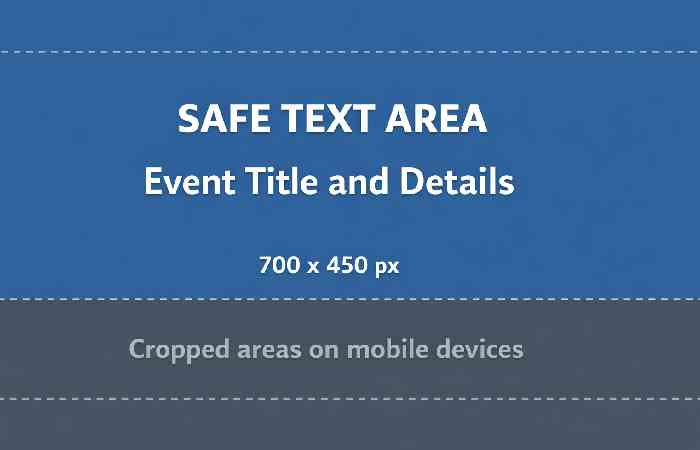
This layout shows where the main event information should be placed when designing a banner.
Facebook Event Banner Display on Different Devices
Different devices display banners differently, which affects how designs appear.
Device Display Comparison
| Device | Banner Display |
| Desktop | Full banner visible |
| Mobile | Cropped edges |
| Tablet | Slight cropping |
| Large monitor | High resolution display |
Designers should prioritize mobile-friendly layouts since most users access social media through smartphones.
Tools to Design Facebook Event Banners
Several online tools allow users to create professional event banners without advanced graphic design knowledge.
Popular Banner Design Tools
| Tool | Best For |
| Canva | Beginner-friendly templates |
| Adobe Photoshop | Advanced editing |
| Adobe Express | Quick social media designs |
| Figma | Collaborative design |
| Snappa | Fast banner creation |
These tools provide pre-designed templates that match the Facebook event banner size.
Visual Structure of an Event Banner
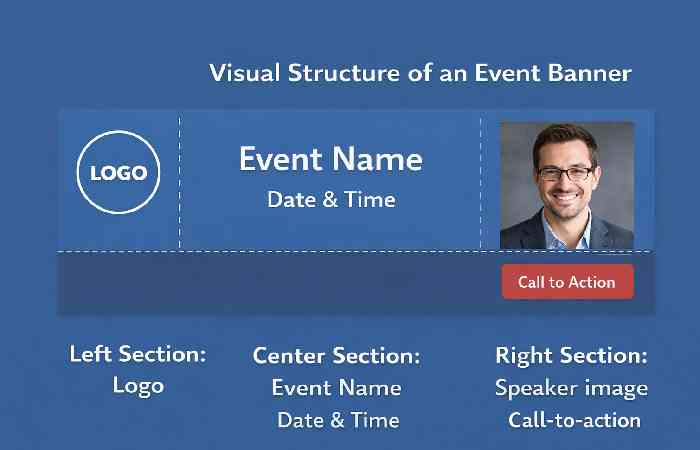
This layout creates a balanced and readable banner design.
Key Design Elements of a Facebook Event Banner
A good event banner should communicate the event message instantly.
Important Banner Components
| Element | Purpose |
| Event title | Identifies the event |
| Date and time | Scheduling information |
| Location or link | Event access details |
| Branding | Builds brand recognition |
| Background image | Visual attraction |
- These components help viewers quickly understand the event.
- Facebook Event Banner Templates for Different Event Types
Key Design Elements of a Facebook Event Banner
This section helps readers quickly understand how to design banners for different events.
Facebook Event Banner Template Examples
| Event Type | Recommended Design Style | Key Visual Elements |
| Webinar | Minimal professional layout | Speaker photo, date, brand logo |
| Conference | Corporate theme | Multiple speakers, schedule |
| Product Launch | Bold promotional graphics | Product image, launch date |
| Workshop | Informative design | Instructor name, location |
| Music Event | High-energy visuals | Artist photo, stage lights |
| Charity Event | Emotional imagery | Cause visuals, donation link |
| Online Course | Clean educational design | Instructor photo, topic |
| Networking Event | Professional layout | Event title, networking theme |
| Community Event | Friendly graphics | Local imagery, participants |
| Festival | Colorful layout | Event theme, activities |
Designers often use templates from tools like Canva or Adobe Express to quickly build event covers.
Resource:
https://developers.facebook.com/docs
Facebook Event Banner Design Tips
Following a few simple design tips can dramatically improve banner quality.
- Effective Design Tips
- Use high-resolution images
- Choose readable fonts
- Maintain color contrast
- Avoid overcrowding graphics
- Place text inside the safe zone
- Use minimal text for clarity
- Align elements properly
These tips improve readability and overall visual appeal.
Facebook Event Banner Design Checklist
This section provides a quick checklist for designers and marketers.
Event Banner Design Checklist
Before uploading your banner to Facebook, confirm the following:
- Banner size is 1920 × 1005 pixels
- Important text stays inside the safe zone
- Image resolution is high quality
- Event title is easy to read
- Colors have strong contrast
- Branding or logo is visible
- Call-to-action is clear
- Fonts are limited to 2 or 3 styles
- Design looks balanced on mobile
- File size is below 30MB
Quick Quality Check Table
| Design Factor | Recommended Standard |
| Resolution | High definition |
| Font size | Large and readable |
| Text placement | Center safe zone |
| Image clarity | No pixelation |
| Color contrast | High visibility |
Using this checklist ensures that your event banner looks professional.
Color Combinations for Event Banners
Color choices affect how users perceive an event.
Popular Color Schemes
| Primary Color | Secondary Color | Best For |
| Blue | White | Corporate events |
| Black | Gold | Premium events |
| Red | White | Promotions |
| Purple | Pink | Creative events |
| Green | Beige | Environmental events |
Choosing appropriate colors helps communicate the event theme effectively.
Common Facebook Event Banner Mistakes
Many banners look unprofessional because of simple design mistakes.
- Mistakes to Avoid
- Uploading low-resolution images
- Placing text near the edges
- Using too many fonts
- Adding excessive text
- Ignoring the safe zone
- Using poor color contrast
Avoiding these issues ensures your banner looks polished.
Visual Design Pyramid for Event Banners
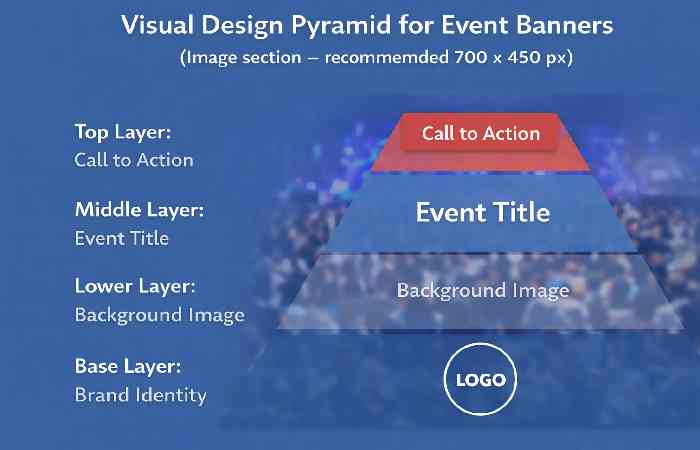
This visual hierarchy improves readability and engagement.
Facebook Event Banner Size – People Also Ask
What Is the Best Size for a Facebook Event Banner?
| Specification | Size |
| Recommended size | 1920 × 1005 px |
| Minimum size | 1200 × 628 px |
| Aspect ratio | 1.91:1 |
What Size Is the Facebook Event Banner in 2026?
| Dimension | Size |
| Width | 1920 px |
| Height | 1005 px |
Facebook Event Banner Size Mobile
| Device | Display |
| Desktop | Full banner |
| Mobile | Cropped sides |
| Tablet | Slight cropping |
Facebook Event Banner Size in Pixels
| Measurement | Pixels |
| Width | 1920 px |
| Height | 1005 px |
Banner Safe Zone
| Area | Dimension |
| Center safe zone | 960 × 540 px |
| Side crop | 480 px |
Facebook Event Banner Size in Inches
| Unit | Dimension |
| Width | 20 inches |
| Height | 10.5 inches |
Comparison of Event Banner Sizes Across Social Media
Social Media Banner Size Comparison
| Platform | Banner Size |
| Facebook Event Banner | 1920 × 1005 px |
| LinkedIn Event Banner | 1776 × 444 px |
| YouTube Channel Banner | 2560 × 1440 px |
| X (Twitter) Header | 1500 × 500 px |
Platform Display Differences
| Platform | Design Focus |
| Event promotion | |
| Professional events | |
| YouTube | Channel branding |
| X (Twitter) | Profile identity |
Understanding these differences helps marketers design banners optimized for each platform.
Why Facebook Event Banners Are Important for Marketing
Event banners are not just decorative images. They play a major role in online promotion.
- Marketing Benefits
- Increases event visibility
- Improves brand recognition
- Encourages event registrations
- Creates professional impression
- Helps communicate event theme quickly
A well-designed banner can significantly improve event engagement rates.
Final Thoughts
Understanding the correct Facebook event banner size helps event organizers create professional and visually appealing event pages.
By using the recommended dimensions of 1920 × 1005 pixels, maintaining a proper safe zone, and designing with mobile users in mind, banners will appear clear and balanced on all devices.
Combining the correct size with strong visuals, minimal text, and clear messaging ensures that your event attracts attention and encourages users to participate.
A well-designed banner not only improves the appearance of an event page but also increases engagement, registrations, and overall success.
Yasmeen is a business and digital content writer at InBusinessWorld with more than five years of experience creating informative, practical and reader-focused content. She covers business, finance, marketing, technology and digital trends, helping readers understand important developments, strategies and ideas across the modern business landscape.
View Syeda Yasmeen Profile →
Sameena is a content reviewer and editorial specialist at InBusinessWorld with more than five years of experience reviewing digital content. She reviews business, finance, marketing, technology and related editorial content with a focus on clarity, accuracy, readability, logical structure and overall content quality.
View Sameena Begum Profile →